Magento 1 to Magento 2 migration is a painstaking task fraught with various issues. Yet it is a necessary step if you want your Magento store to be up to date, secure, and competitive on the market.
Having over 40 successful migration projects behind our back, we’ve compiled the most definitive Magento 2 migration guide on the web. In this article, we describe the process of regular Magento 1 to 2 migration.
Those of you who wish to migrate to Magento 2 with a progressive web application may check out these articles on , , and .
Table of Content
1) Why Is It Essential to Migrate to Magento 2?
When we talk with our potential customers about their need to migrate, they all agree that it’s a good idea and they should be doing it. And yet they don’t. Why?
Well, we’ve found 3 main reasons why store owners don’t rush to migrate their stores right away:
- merchants fear the ;
- they don’t fully understand why they need to move right now;
- they want things to “just work” and fear change.
All these points are legitimate, and unlike most of our competitors, we don’t push clients to upgrade from Magento 1 to Magento 2 if they aren’t ready yet. At Onilab, we prefer to make value-based considerations for every project. We take the level of customization and current site performance into account.
In any respect, your Magento 1 store is unique, just like your business. Yet, regardless of how customized it is, here 4 reasons why you shouldn't postpone migration to Magento 2.
- Magento 1 stopped getting security patch updates since summer 2020. So, data protection and other safety matters are now entirely your responsibility. Otherwise, you can fall prey to hacks that may result in heavy fines and other problems.
- Magento 1 doesn't get functionality and module updates anymore either. This means that you're stuck with what was available before June 2020. Alternatively, you have to invest in custom development so the store doesn’t become outdated. This is both time and budget-consuming.
- By not migrating from Magento 1 to Magento 2 you're missing out on the improved features and solutions that Magento 2 provides out-of-the-box. These include better checkouts, SEO tweaks, mobile optimization capabilities, among other things.
- You're deprived of the opportunity to convert your M1 storefront into a progressive web application. And PWAs are a proven way to boost conversions, especially on mobile devices. Take a look at these and for some inspiration.
Plus, dive into our case study on . During our collaboration, we moved the website to Magento 2 and went further by creating a PWA. This move was pivotal: it automated many manual processes and significantly optimized the overall user experience for both desktop and mobile users. Check out how we transformed Timetravels into a seamless, high-performing PWA.
2) Magento 1 to Magento 2 Migration Process & Duration Breakdown
Migration to Magento 2 is considered to be a complicated process. It involves the collaboration of different people: a project manager, designer, developer, QA engineer. In the last several years, we’ve successfully finished over 40 major migration projects. In the process, we discovered quite a few patterns and decided to create a detailed migration checklist.
This checklist on how to migrate Magento 1 to Magento 2 explains how we organize migration processes at Onilab. It describes what stages it includes and how to handle every milestone.
But how long does it take to migrate Magento 1 to Magento 2? The duration will heavily depend on:
- the number of extensions;
- design and theme requirements;
- additional features;
- third-party extensions;
- the number of store views.
Let’s take a look at the main Magento 1 to Magento 2 migration steps and why they can take so long to complete.
3) Milestone 1. The Planning Stage
Step 1. Assess the Current Environment and Migration Scope
First, we must make sure that both the client and our team understand the complexity of the task ahead. FWe create a Magento migration plan and analyze the migration scope by estimating the following factors:
- the current technical functionality of the website (third-party extensions, integrations with different ERPs and CRMs, custom themes, Magento core customizations, etc);
- the size of the store, as well as the number of storefronts and domains in use;
- the functional changes that have to be made during migration to Magento 2.
Besides the Magento 2 migration plan, we provide an explicit evaluation of the migration cost to our client. We analyze the effort and time the engaged specialists would spend migrating the M1 store to Magento 2. I.e., we estimate how much time it takes to:
- develop code of the new Magento 2 website;
- develop a new design of the store;
- build up custom functionality from the ground up (or find proper replacements for the existing third-party modules).
Estimate hours for the planning step:
40-60 hours
Step 2. Put Together a Customer Journey Map
A customer journey map is a visualization of every experience a customer has with a store. Its major purpose is to understand what stages customers go through (from initial engagement to forming a long-term relationship).
A quality shopping experience isn't just a buzzword. You need to ensure both smoothness and consistency at all touchpoints and across all channels.
Basically, the map includes the following information:
- the definition of a potential (target customer);
- a typical customer lifecycle;
- touchpoints a customer uses to interact with the company;
- pain points (points of friction);
- methods of resolving the friction.
Some companies ignore this stage of Magento store migration claiming this method is old-fashioned. However, at Onilab, we consider mapping to be one of the most important milestones. The collected information helps designers and developers to minimize negative customer experience, correct mistakes, and deliver better UX on the new Magento 2 store.
Estimate hours for the CJM step:
30-40 hours
4) Milestone 2. Create UX and UI of the Future Magento 2 Website
Usually, you have three paths when deciding what to do with your store’s design during the Magento 1 upgrade to Magento 2.
Option 1. Moving Your Old Design Without Any Changes
You will, of course, save some time as you migrate from Magento 1 if you only want to keep the current design without changing anything. But it’s not the best option since so much has changed in eCommerce UX\UI recently. And the process is time-consuming in any case.
Option 2. Customizing a Ready-made Magento Theme
You are free to switch the old design to an out-of-the-box template from the Magento Marketplace or Theme Forest if it meets your requirements. The designers can customize such a theme or develop a new design using a mixed method (combining custom templates, layouts, styles, or images).
By choosing this way, you can drastically reduce front-end UX/UI design efforts and costs for upgrading from Magento 1 to Magento 2. Just bear in mind that because of the sheer amount of customized code, such themes can slow you down. So, you basically get a better deal but may lose performance speed in the process. We offer , ensuring themes are optimized without overloading your store.
Option 3. Working on a New Design
We recommend that you create a brand-new design as you switch Magento 1 to Magento 2. Why? The amount of effort to simply move the design and to create a new one is comparable here.
You are going to migrate to a new store. This is a great time to experiment and improve. The designers can use the information collected during the customer journey mapping to create UX and UI for the new website. So, after moving from Magento 1 to Magento 2 you may:
- work on your store’s user experience;
- rework your layout to improve usability;
- technically to allow users faster access to key pages;
- get more visibility for your bestsellers and most searched for items by enhancing the navigation and ;
- rework product categories and boost conversions in underperforming ones;
- move inefficient UI elements and switch things around.
What are the steps?
Designing a new look takes about 80-250 hours depending on the workload and how many changes you want to make. Usually, we offer at least 2 versions of your new store. Even with minimal changes we still need to:
- analyze the UX and friction points, find and fix UI issues, discover flaws in the sales funnel;
- create separate wireframes for mobile, tablet, and desktop layouts (since users interact with your store differently on various devices);
- review the store structure and make changes to UI elements;
- rework navigation logic and the main menu for all 3 platforms;
- plus, the designers consult with the developers to get approval and make sure that the new design is convenient to deploy and beneficial for the client.
Can you make it shorter?
Yes, if you do your homework before you contact the development team and know which changes you want to make during Magento site migration and what they’ll look like in the final version. Alternatively, you can take a ready-to-use theme instead of creating a custom design. This way, you can easily cut the time from 250 to 120 hours or less.
Estimate hours for the UX\UI step:
120 - 250 hours

40 Hours of Magento Services. FOR FREE
Try our custom development, optimization, support, and design services. One week, free of charge, no strings attached.
5) Milestone 3: Magento 1 to Magento 2 Migration Process (from the Development Perspective)
The frontend and backend work milestone of the upgrade to Magento 2 will take the bulk of your migration budget. This is where you spend 336-672 hours (2-4 months worth of development time).
Frontend and backend work during Magento to Magento migration is all about applying the design that we developed. Then you iron out the compatibility bugs, optimize old extensions, or develop new ones.
Even though it’s the longest milestone of all, it’s hard to measure its length precisely. The time you’ll need to implement all frontend and backend changes is individual for every case. The longest migrations can last 8-9 months, sometimes more.
What are the Magento 2 migration steps?
The time it’ll take to create strong frontend and backend functionality depends on what you need from the store. In essence:
- Extensions take a lot of time to develop, install, and test for compatibility.
- Complicated design layouts require skilled and dedicated frontend experts to apply it correctly on all versions of the store.
- Magento backend tasks depend on how many changes you need.
- You also have to figure out how to build in all the necessary integrations.
- Then you optimize the store for speed and security.
Can you make it shorter?
Yes. The less customized your store is, the less time you’ll need to upgrade Magento 1 to Magento 2. It’s completely possible to complete the backend and the frontend parts of the store in 2-3 months. Expect to spend around 100 hours dealing with extensions. The rest of the time is for working on frontend layout, backend functionality, and various bug fixes.Now let’s go over the 8 main Magento migration steps from the development perspective.
Step 1. Preparation Works
Before starting the Magento 1.9 to 2.0 migration, the development team must make sure to have all the required software and setups. Depending on the used version of Magento, there’ll be different requirements for the software.
For Magento 2.3.x:
- The PHP version must be 7.3.x.
- The MySQL database version of 5.7, or the MariaDB database version of 10.2.
- As well as these PHP extensions: bc-math, ctype, curl, dom, gd, hash, iconv, intl, json, libxml, mbstring, openssl, PDO/MySQL, SimpleXML, soap, spl, xsl, zip.
For Magento 2.4.x:
- The PHP version must be 7.4.x.
- The MySQL database version of 5.7.9 or 8.0, or the MariaDB database version of 10.2 or 10.4.
- As well as these PHP extensions: bc-math, ctype, curl, dom, gd, hash, iconv, intl, json, libxml, mbstring, openssl, PDO/MySQL, SimpleXML, soap, spl, xsl, zip.
- The Elasticsearch advanced search solution version 7.9.x.
What’s for hardware, it is advised to have at least 2G of RAM, otherwise, there won’t be enough resources to compile the code. Furthermore, a combo of the SSD technology with 24GB+ will allow the store to work quicker.
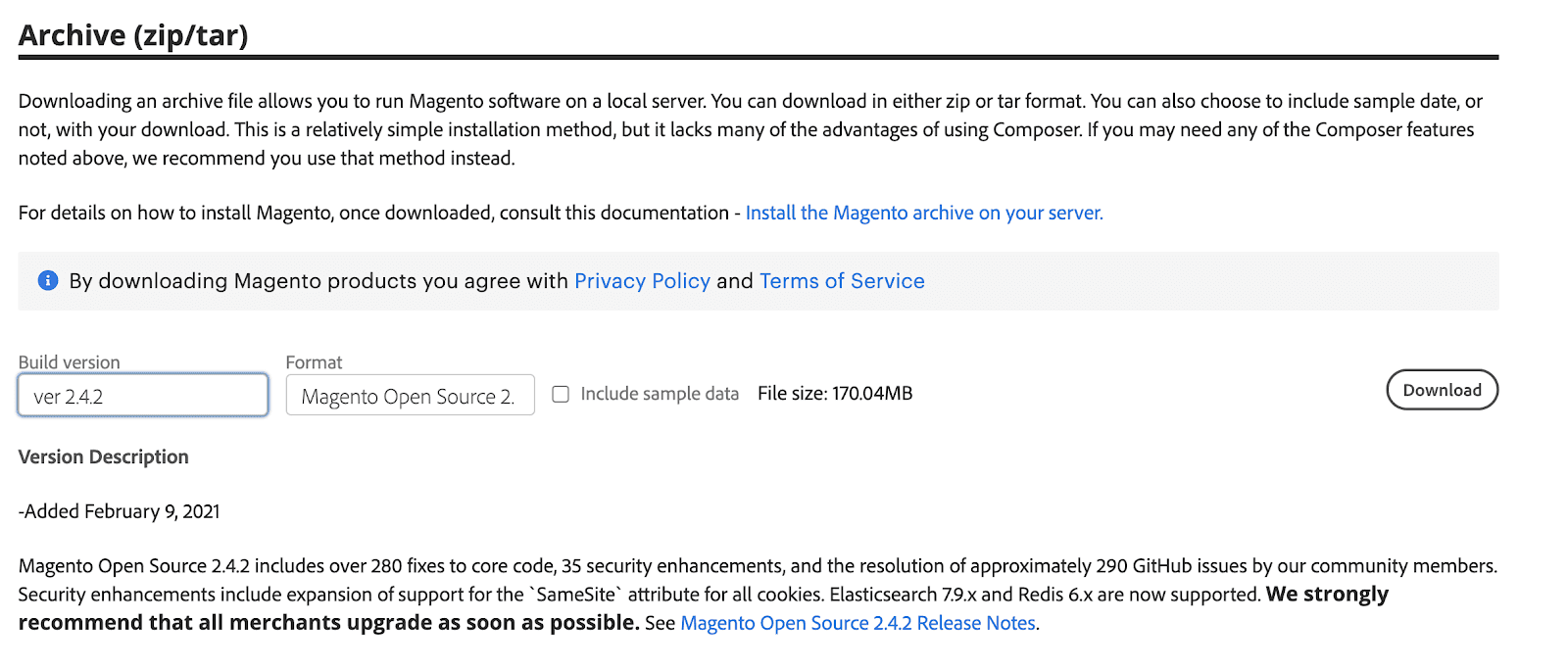
Note that the migration to Magento 2 won’t be possible if you don’t install the freshest version of Magento, currently, it is 2.4.2. The Open Source edition can be downloaded from the official site.
For detailed guidance on optimizing your Magento 2 database for peak performance, be sure to check out our in-depth article on "".
Step 2. Configuring the Magento Data Migration Tool
We recommend the standard Magento 1 to Magento 2 data migration tool to move your store.
Mind that you’ll have to write custom logic to correctly move and merge data from the source platform. You’ll also have to make changes to the code in order to move any custom data. These are tables or columns that are not a part of the Magento 2 standard dataset.
Here’s a short Magento 2 data migration tool tutorial to help you out.
- You can use the code from the example below to install the Magento database migration tool:
root# composer require magento/data-migration-tool:2.4.2
./composer.json has been updated
Loading composer repositories with package information
Updating dependencies (including require-dev)
Package operations: 1 install, 0 updates, 0 removals
- Installing magento/data-migration-tool (2.4.2): Downloading (100%)
Writing lock file
Generating autoload files- Now we make changes to the data migration tool for Magento 2 in the corresponding directory in the Magento 2 root folder. Copy the configuration file for your version of Magento 1.
vendor/magento/data-migration-tool/etc/opensource-to-opensource/1.9.x- Make sure to replace the "1.9.x" with the Magento 1 version that your store is running on. Plus, if you're changing the edition of the store as you migrate (f.e. from Community to Enterprise/Commerce), you'll have to make changes in the following line:opensource-to-opensource → opensource-to-commerce
- In the config.xml file indicate from where and to where the data should be migrated like in the following example:
<source>
<database host="localhost" name="m1" user="m1" password="m1"/>
</source>
<destination>
<database host="localhost" name="m2" user="m2" password="m2"/>
</destination>- Then indicate the crypt_key field within the options tag:
<options>
……
<crypt_key>85ba8337149597a561bee04ec6c9a347</crypt_key>
……
</options>- The crypt_key that you have on your Magento 1 site is placed inside the app/etc/local.xml file in the store's root folder:
<config>
<global>
<install>
<date><![CDATA[Wed, 17 Feb 2021 21:29:35 +0000]]></date>
</install>
<crypt>
<key><[CDATA[<strong>85ba8337149597a561bee04ec6c9a347</strong>]]></key>
</crypt>
<disable_local_modules>false</disable_local_modules>
<resources>
Step 3. Settings Configuration & Migration
The next step of how to migrate Magento is to migrate settings and other data.
- In the root folder of Magento 2 do the following:
php bin/magento migrate:settings vendor/magento/data-migration-tool/etc/opensource-to-opensource/1.9.x/config.xmlThis is what we got as a result:
[2021-02-17 18:22:22][INFO][mode: settings][stage: integrity check][step: Settings Step]: started

100% [============================] Remaining Time: < 1 sec

[2021-02-17 18:22:22][INFO][mode: settings][stage: integrity check][step: Stores Step]: started

100% [============================] Remaining Time: < 1 sec

[2021-02-17 18:22:22][INFO][mode: settings][stage: data migration][step: Settings Step]: started

100% [============================] Remaining Time: < 1 sec

[2021-02-17 18:22:24][INFO][mode: settings][stage: data migration][step: Stores Step]: started

100% [============================] Remaining Time: < 1 sec

[2021-02-17 18:22:24][INFO][mode: settings][stage: volume check][step: Stores Step]: started

100% [============================] Remaining Time: < 1 sec

[2021-02-17 18:22:24][INFO][mode: settings][stage: volume check][step: Stores Step]: Migration completed
- The example above was rather basic. Thus, if you’re case needs a more in-depth configuration than just installing the stock, you should make changes to the settings in the configuration file: (vendor/magento/data-migration-tool/etc/opensource-to-opensource/1.9.x/config.xml) as shown below. Note that prior to making edits, you should copy this to settings.xml.
<settings_map_file>etc/opensource-to-opensource/settings.xml.dist></settings_map_file>- Furthermore, make sure to check the naming of the config.xml file.
<settings_map_file>etc/opensource-to-opensource/settings.xml</settings_map_file>- In case some settings in the settings.xml should be ignored, run this command:
<ignore>
<path>path/to/setting</path>
</ignore>- In case some settings in the settings.xml should be named differently:
<rename>
<path>crontab/jobs/system_backup/schedule/cron_expr</path>
<to>crontab/default/jobs/system_backup/schedule/cron_expr</to>
</rename>
Step 4. Develop Custom Functionality for a Magento 2 Store
Developing custom functionality for a new Magento 2 store is a good share of the work. At this stage, is a “must”. You can minimize the risk of wasting time fixing bugs that appeared due to the work of ham-handed “specialists”.
A major part of the code has to be created manually from scratch. Yet you can migrate some custom code from Magento 1.x to Magento 2.x. To make the process easier, you may use . This Magento migration tool provides scripts for converting custom M1 code to M2 by handling the migration of the following aspects of code to the structure and format recognized in Magento 2:
- Layout XML files;
- Config XML files;
- PHP files;
- Module directory structure.
Note that you’ll still need to manually edit some of the generated files.
Step 5. Find Replacements for the Existing Modules or Create New Ones
When you migrate from a completely different platform, it’s hard to find identical functionality readily available for your store. Be prepared to make a few compromises.
Looking at your existing custom functionality, you have 3 main options in terms of alternatives.
- Extensions that have both M1 and M2 versions in the Magento Marketplace. Most Magento 1 extensions have M2 alternatives although the functionality itself can be different.
- Extensions that are exclusive to the previous platform but have third-party alternatives.
- Completely unique customizations that you’ll need to rebuild for the Magento 2 platform from the ground up.
We encourage you to do a full inspection of all the extensions you have before you move from Magento 1 to Magento 2. Make a list of all the customizations and rank them in the order of priority. Put all extensions into 3 columns ranging from “Essential” to “Nice-to-Have” to “Unimportant”.
Moving from one platform to another is a great opportunity to declutter and clean your store. Try to drop as many unnecessary extensions as you can. This may help to both cut migration costs and improve future performance.
Conduct Magento 2 Plugins Testing
When you’ve found the proper replacement for the existing functionality (or developed new modules), conduct Magento 2 modules testing. It’s a complex process that involves the engagement of QA engineers and uses specifications or other inner documents.
At Onilab, this process includes the following stages:
- testing the functionality of every extension;
- testing Magento 2 features that can be affected by the modules;
- load testing (some plugins will potentially deal with a huge amount of visitors and data; as such, it is important to check the response time of the pages with high traffic on the frontend and how these plugins handle big amounts of data on the backend);
- cross-browser and mobile checking;
- checking extensions compatibility with other third-party extensions;
- standard security testing;
- testing in production mode.
Step 6. Configure the Servers
Server configuration is one of the most important parts of the development phase as you migrate from Magento 1.x to Magento 2. Because Magento’s second version is considered slower than the first one, some caching tools are essential for good performance.
As such, we recommend Varnish, a tool that creates an extra layer between the web server and the user. It accelerates HTTP traffic, helping the user to see the page almost instantly, and visibly increasing your store's speed.
Plus, when combined with a CDN, Varnish can contribute even more to Magento 2 performance improvement thanks to cached images. Redis can handle your database object caching to speed up dynamic database-driven websites. This is a neat caching tool for the backend, optimizing Magento session storage.
Step 7. Magento 1 to Magento 2 Data Migration Steps
The Magento database migration milestone consists of five data categories that you should move in order to complete the process. These are:
- customer data (time to migrate customers from Magento 1 to Magento 2);
- product data (including the need to export products);
- orders data;
- store settings;
- third-party extensions data.
Each of these 5 entities takes about 8 hours to migrate. It all depends on the number of custom fields that you have in them. The lower the number, the faster you can move them.
Each new custom attribute adds to the complexity of the migration. You have to manually migrate them in order to correctly move them from one store to the other, often using a CSV file to handle the data transfer during the import process.
The biggest challenge is how you handle your custom data. Migrating a standard account information table takes one hour tops. Moving the same amount of heavily customized data with the ability to use that customized data in the future will amount to 8 hours of work. Which brings us to 20-40 hours for Magento data migration.
Can you make it faster?
Leave something behind. Or don’t import anything during Magento migration from 1 to 2 and just get an empty store. You might not need some data from 10 years ago or 5-year-old Magento 1 logs. Maybe it’s cheaper to fill the store by hand.
Now let’s take a look at how data migration is handled from the development perspective.
a) Migrating initial data
During this step, migrate the data of your Magento store. This includes information on your clients, users, orders, etc. Use the example of the following command:
# php bin/magento migrate:data vendor/magento/data-migration-tool/etc/opensource-to-opensource/1.9.x/config.xmlKeep in mind that there may be errors at this point. Yet they can be fixed using the settings of the Magento 2 data migration tool.
b) Media files migration
As a rule, media files are migrated to Magento 2 manually.
- Nevertheless, numerous Magento 1 stores keep their media files in a database. If this is your case, the media files will automatically move to Magento 2, yet they need to be synced prior to migrating the data. This is done like this: Backend menu of Magento 1 → System → Configuration → Advanced → System → “Synchronize”
- If you store your store’s media in file format, copy the media folder in Magento 1 to pub/media in Magento 2 like this:
cp -r /path/to/m1/media /path/to/m2/pub- Next, use these two commands to reindex and then recompile the Magento 2 store:
php bin/magento indexer:reindex

php bin/magento deploy:mode:set production
As a result of Magento 1 to Magento 2 product migration works, the Magento 2 store should now be fitted with all the products from Magento 1.
Step 8. Make Tweaks
The store launch is not the end of development. Often you’ll need to make time for various tweaks, bug fixes, and feature requests from the stakeholders. Also, remember to put aside some resources for feedback and technical emergencies.
Estimate hours for the development & data migration stage:
640-800 hours
6) Migration from Magento 1 to Magento 2: Duration Estimates (Total)
| Milestone | Average Hours |
| The Planning Stage | 40-60 hours |
| Putting together a CJM | 30-40 hours |
| UX and UI (mobile/tablet/desktop design) | 120-250 hours |
| Frontend and backend work, data migration, and post-release work | 640-800 hours (which is 4-5 months) |
| Grand Total: | Approximately 830-1150 hours (which is 4-7 months) |
Final Word
There you have it, the most definitive guide on the Web on how to upgrade from Magento 1 to Magento 2. The goal of this article is to inform you about the scope of such a process and to direct you to a thorough guide where you can learn more about a specific issue.
Evaluate the existing environment and migration scope, design the UX and UI for the future Magento 2 website, configure a data migration tool, and consider post-launch activities. And if you need help with certain or would like to turn to us for professional , we’d be glad to help!